
Special Offers
Kitronik Arcade for micro:bit - MakeCode ARCADE (Excluding micro:bit)
R7FA4 PLUS A Development Board, Based on R7FA4M1AB3CFM, Compatible with Arduino UNO R4 Minima
MOTION 2350 Pro - Advanced Robotics Controller for Beginners

R48.40 Inc VAT R65.90
Specifications:
- 5V DC fan for 3D Printers
- 40x40x10mm
What's in the box?
1 x 5V 40mm DC Fan for 3D Printer

Kitronik Arcade for micro:bit - MakeCode ARCADE (Excluding micro:bit) (KT Arcade mbit)
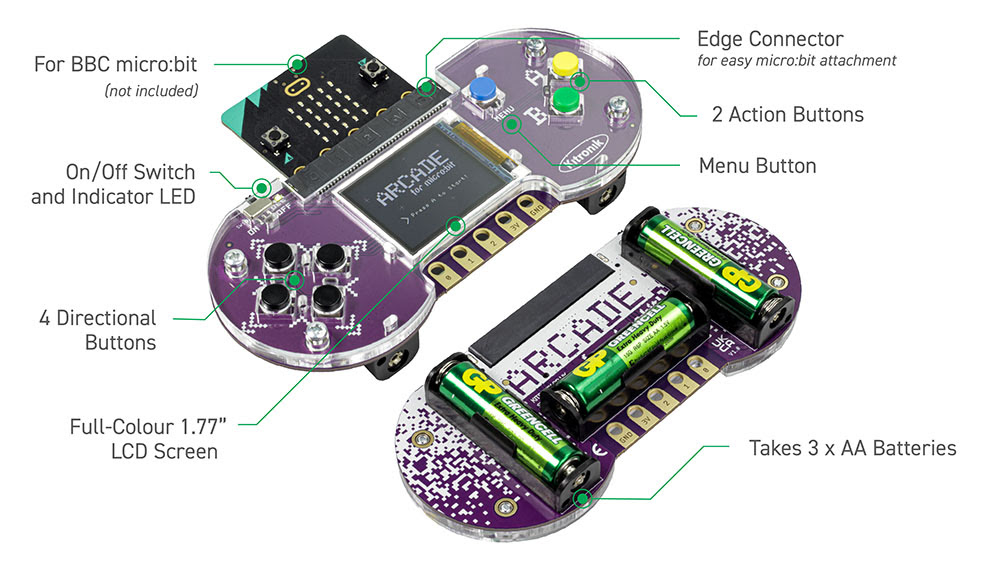
The Kitronik ARCADE for micro:bit is a fully assembled, compact and powerful gamer.
R699.90 Inc VAT R739.90
The Kitronik ARCADE for micro:bit is a fully assembled, compact and powerful gamer. The micro:bit(NOT INCLUDED) controls the gamer with a full colour LCD screen, perfect for playing retro games which have been coded and created via the popular MakeCode Arcade block editor!
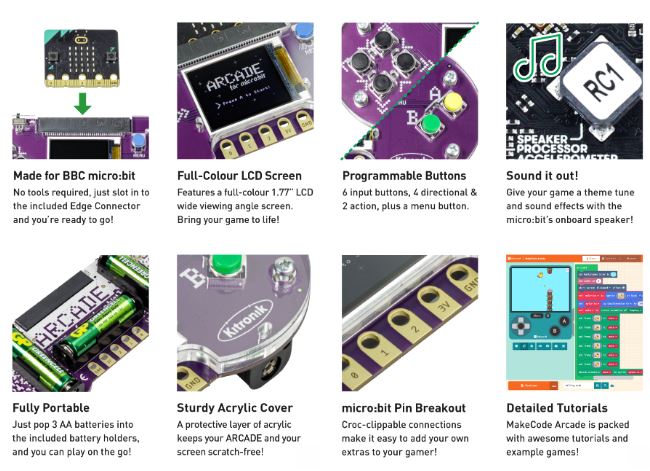
For teachers and students to get started it’s as simple as:
Plug in a micro:bit(NOT INCLUDED),
Download a pre-coded game or let them create their own using the wealth of resources available with the MakeCode ARCADE site
Let them play the lesson away while having fun and learning at the same time!
What's in the box?
1 x Arcade for micro:bit
Resources
- Kitronik Arcade for micro:bit Datasheet
- An extensive range of resources are currently available via the MakeCode ARCADE website

R247.85 Inc VAT R334.90
Specifications
| MODEL |
(This product) | (Also available) | |
|---|---|---|---|
| MICROCONTROLLER | R7FA4 (32-bit ARM Cortex-M4) | R7FA4 (32-bit ARM Cortex-M4) | |
| ESP32-S3FN8 (Dual-core 32-bit Xtensa LX7) | |||
| CLOCK FREQUENCY | R7FA4: 48MHz | R7FA4: 48MHz | |
| ESP32-S3FN8: 240MHz | |||
| STORAGE | R7FA4: 256kB Flash, 32kB RAM | R7FA4: 256kB Flash, 32kB RAM | |
| ESP32-S3FN8: 384kB ROM, 512kB RAM, 8MB Flash | |||
| WIRELESS COMMUNICATION | None | 2.4GHz WiFi + Bluetooth LE | |
| OPERATING VOLTAGE | Options for 5V/3.3V, support more shields | ||
| POWER INPUT | 6~24V | ||
| RESET BUTTON | Lateral, easier to use when connecting with shield | ||
| IO PIN OUTPUT CURRENT | 8mA | ||
| DIGITAL PINS | 14 | ||
| ANALOG PINS | 6 | ||
| DAC | 2 | ||
| PWM | 6 | ||
| UART | 1 | ||
| I2C | 1 | ||
| SPI | 1 | ||
| CAN | 1 | ||
| DC JACK | Low profile, shields won't be blocked anymore while connecting | ||
| POWER OUTPUT HEADER | Provides 5V OR 3.3V power output and common-grounding with other boards | ||
| 5V POWER OUTPUT | Up to 2000mA Max, features higher driving capability | ||
| EXPERIMENTAL BOARD | Support, solder pad is provided for DIY interfaces to connect with experimental board | ||

What's On Board?
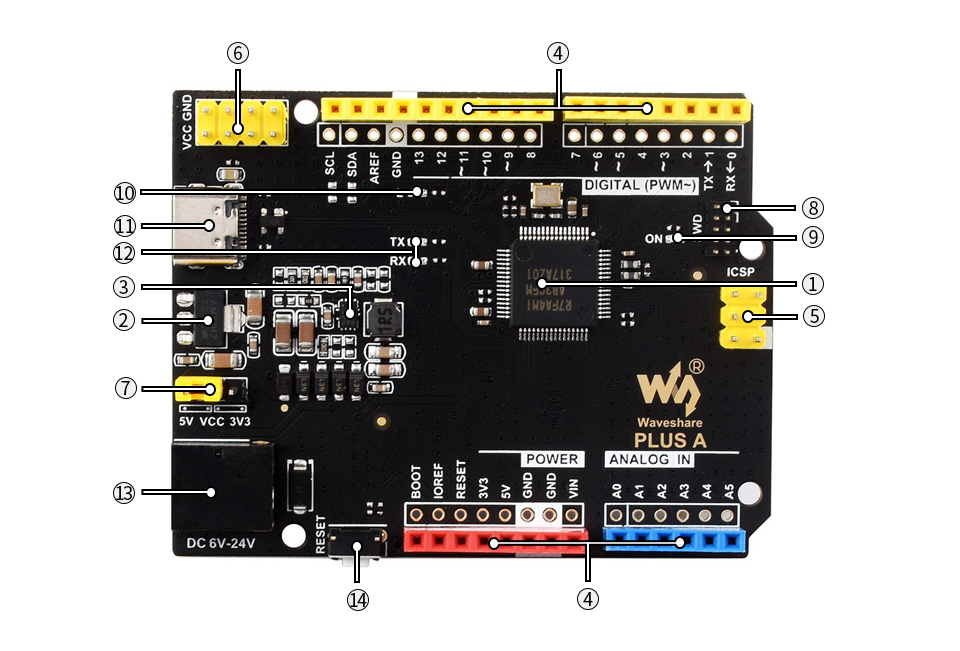
- R7FA4M1AB3CFM
- AMS1117-3.3
3.3V voltage regulator - MP8759
5V voltage regulator - Arduino interface
compatible with standard Arduino interface, adapting 2.54 pitch solder pad, can be directly connected to experimental board - ICSP interface
- Power output header
3.3V OR 5V, voltage level configured by the onboard power configuration switch, used as power output and common-grounding with other boards
- Power configuration
for configuring R7FA4 PLUS A operating voltage - SWD indicator
- Power indicator
- User LED
- USB Type-C connector
for uploading program OR serial port debugging - Serial port RX/TX indicators
- DC input
6V ~ 24V - Reset button
Pinout Definition
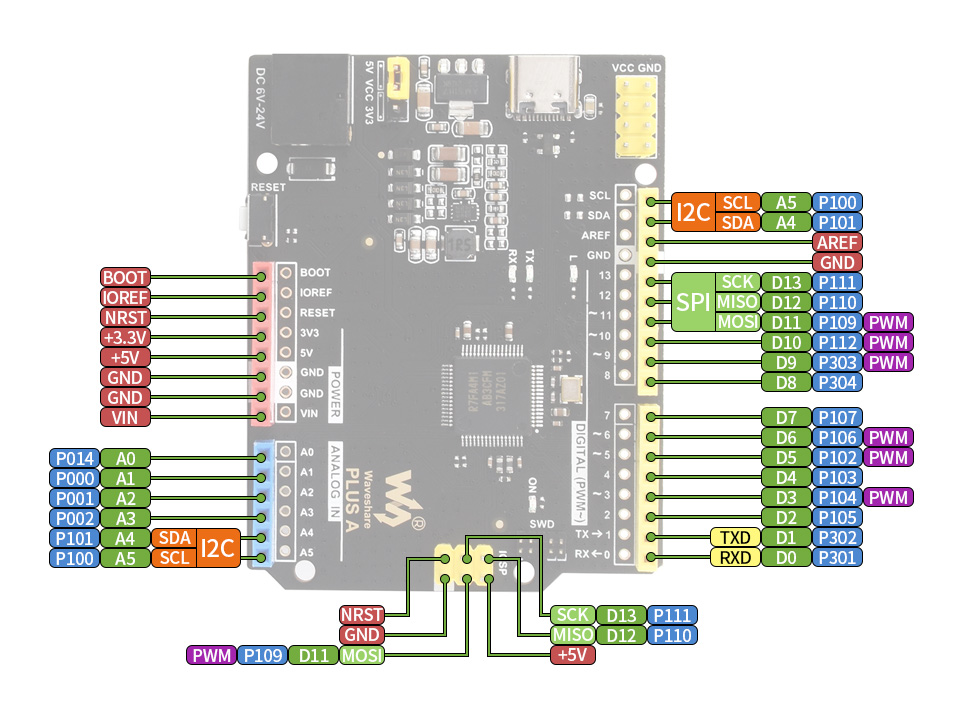
Outline Dimensions
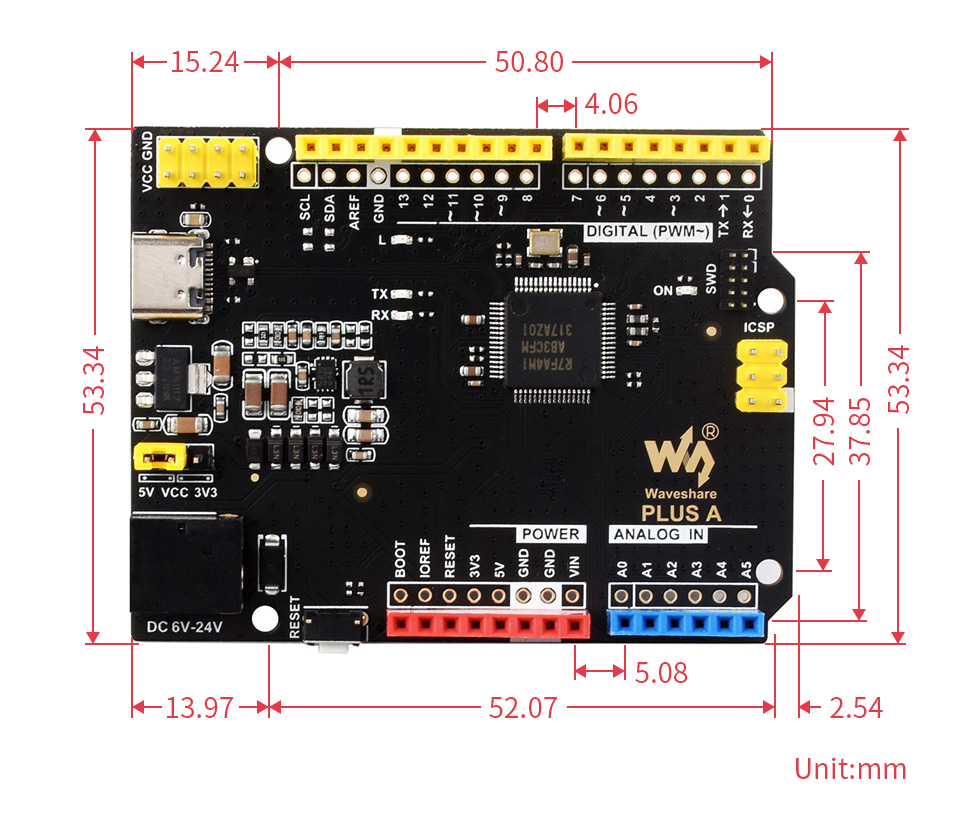
What's in the box?
1 x Arduino Uno Rev 4 compatible
1 x USB Type-A to Type-C cable

Low-Profile ICE Tower CPU Cooling Fan for Raspberry Pi 5 (Pi5 low ice tower)
U-Shaped Copper Tube, Cooling Fins, With Colorful RGB LED
R403.33 Inc VAT R544.90
Specifications
- SUPPORTED PI: Raspberry Pi 5
- POWER SUPPLY: DC 5V input (can be powered from Raspberry Pi)
- STRUCTURE: Low-Profile ICE Tower-style, 5mm copper tube super heat dissipation
- RATED POWER: 0.4W @5V, 0.08A
- FAN: Powerful RGB colorful LED fan
Large Area Cooling Fins And Directly-Contacted Copper Tube, Super Heat Dissipation
Reducing The Temperature Of The Raspberry Pi From 80℃ To 40℃ While Overclocking
More Silent
Rated Power 0.4W @5V, 0.08A, Elaborately Tuned Fan
Lower Noise, Higher Performance
What's in the box?
1 x Low-Profile ICE Tower
Resources
* for reference only, the Raspberry Pi 5 and TF card are NOT included.
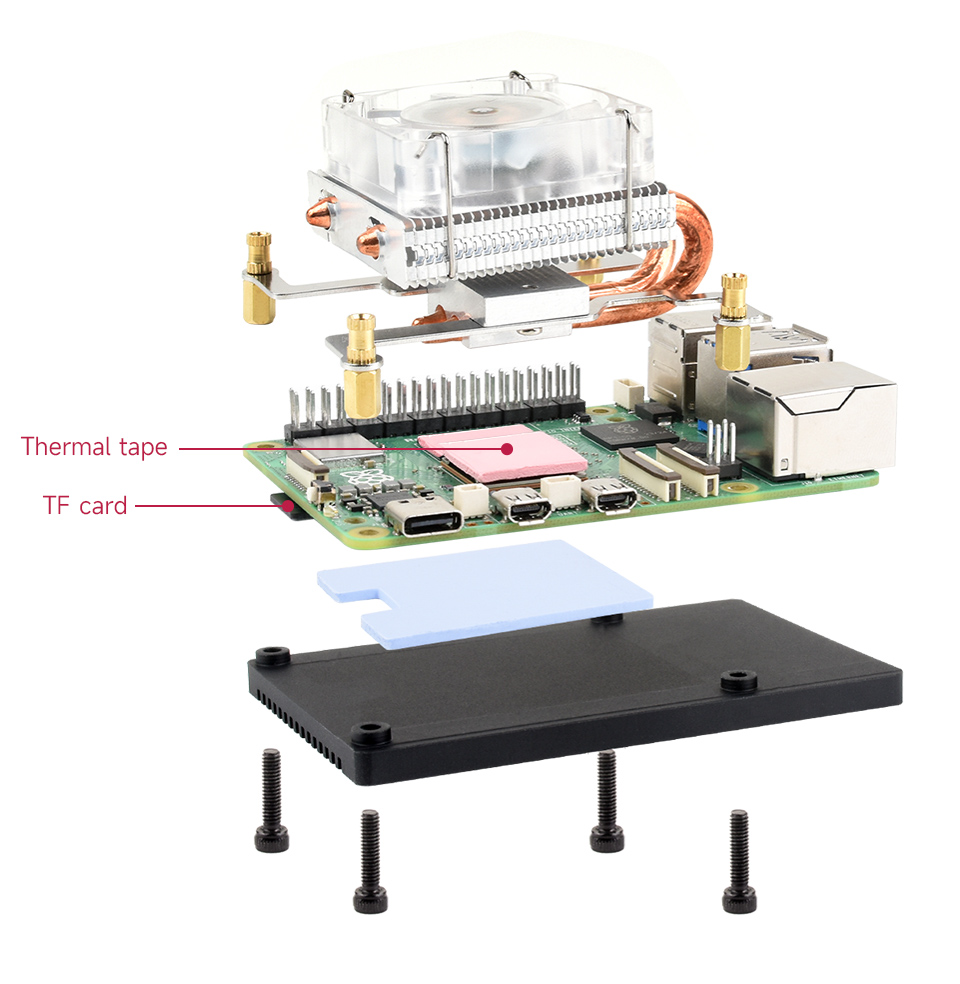

R156.29 Inc VAT R165.35
LCD Digital Mini Handheld Multimeter AC/DC 750/1000V With Probe
LCD Digital Multimeter AC/DC 750/1000V Handheld multimeter for voltmeter, ammeter Ohm tester meter with probes.
Specifications
- DIY Supplies: ELECTRICAL
- Certification: NONE
- Origin: CN(Origin)
- Model Number: Digital Multimeter
- AC Current: /
- AC Voltage: 2-750V
- Measuring Resistance Range: 20k-2000k
- Operating Mode: Manual
- Measuring Inductance Range: /
- Display Type: Digital Display
- DC Current: 200u-2000u-20m-200m-10A
- DC Voltage: 200m-2000m-20-200-1000V
- Measuring Capacitance Range: /
- Dimensions: 190mm x 90mm x 30mm
- Operating Temperature: 0 - 40 ℃
- Colour: Black/Yellow
What's in the box ?

Game 5Pi Retro Gaming Case for Raspberry Pi 5 (52Pi5 Retro Case)
The Game 5Pi Case from 52Pi is a retro gaming enclosure designed for Raspberry Pi 5, offering a retro aesthetic along with epic cooling capabilities!
R499.91 Inc VAT R535.43
The Game 5Pi Case from 52Pi is a retro gaming enclosure designed for Raspberry Pi 5, offering a retro aesthetic along with epic cooling capabilities!
The case pays homage to consoles of days gone by with its on-point retro gaming styling, complete with an awesome USB/Ethernet flap cover which we just love!
It's not just a pretty face either - the Game 5Pi gives you convenient access to most ports on your Raspberry Pi 5 (including SD access), along with power button access and even soft rubber feet. Cooling is a key priority too (essential for a retro gaming setup). The case comes with an Armour Lite V5 heatsink/fan for the Pi 5, as well as a case exhaust fan to keep the overall enclosure temperature down.
Combine with our NES-Style USB controllers for the ultimate 'good ol' days' retro gaming machine!
Raspberry Pi 5 not included
Features
- Retro gaming case for Raspberry Pi 5
- Armor Lite V5 included - Optimal thermal dissipation for the Raspberry Pi
- Side fan cooling system - In addition to the main heatsink and fan, the case features a side fan cooling system to further enhance airflow and cooling efficiency
- ABS Material - Constructed from high-quality ABS material
- Compact retro design - Visually appealing while maintaining a smaller footprint
- Movable cover - A movable cover protects the unused USB and Ethernet ports
- Easy Installation - Designed for easy and hassle-free installation
- Compatibility - The Game 5Pi Case is specifically designed for Raspberry Pi 5
What's in the box?
1 x ABS Upper
1 x ABS Lower
1 x Armor Lite V5 heatsink/Fan
6 x Thermal Pads
1 x Screw driver
2 x M2.5 Screw
4 x Self-tapping screw
Raspberry Pi5 not included
Resources

Creality Ender-3 V3 SE 3D Printer 220x220x250 (Ender-3 V3 SE)
Please Note: This printer will be shipped directly to your address or can be collected at our warehouse 3 to 5 business days after the order was placed.
R4,990.00 Inc VAT R5,225.00
The Creality Ender-3 V3 SE is seen as one of the best entry level printers available. It comes with a ton of features like high printing speed up to 250mm/s, auto bed levelling, a full colour screen interface, Creality's Sprite extruder and updated fresh clean look. Assembly and setup is a breeze, the printer is shipped in its flat state, this means the top section is laid flat in the box. This makes setup quick and easy and is usually done in less than 20 minutes.
Specifications
- Printing technology: FDM (Fused Deposition Modeling)
- Build Volume: 220 x 220 x 250mm
- Max printing speed: 250mm/s
- Printing Resolution: 0.1mm
- Nozzle diameter: 0.4mm (Standard)
- Max nozzle temperature: 260 °C
- Max heated bed temperature: 100 °C
- Printing Surface: PC Spring Steel
- Auto Bed Levelling mode: CR Touch
- Connection mode: SD card
- Compatible file format: STL, OBJ, 3MF
- Slicing Software: Creality Slicer / Cura / Repetier-Host / Simplify3D
- Power Input: 200-240V AC, 50/60Hz
- Rated Power: 350W
- Compatible Filaments: PLA, ABS, PETG, TPU, Wood, Nylon
- Filament Diameter: 1.75mm
- Nett Weight: 7.34kg
- Machine size: 400 x 366 x 490mm
What's in the box?
1 x Creality Ender 3D Printer
Resources
Creality Wiki

R399.90 Inc VAT R486.45
Digital Video Broadcast (DVB) is a widely adopted standard for transmitting broadcast Television.
Please note: it is the responsibility of the end user to ensure that they have the necessary permissions / license to receive broadcast television in their country
This add-on board lets you receive digital DVB-T2 TV streams on your Raspberry Pi to view them or stream them over a network to other devices
To get started you'll need:
- Any 40-pin Raspberry Pi (including Pi Zero 2, provided they have headers soldered)
- A suitable aerial to receive broadcast TV (not provided)
We've put together a downloadable step-by-step guide to Getting started with the TV HAT, which walks you through the complete setup process.
Specifications
The Raspberry Pi TV HAT has a DVB-T2 and DVB-T tuner on board, which allows you to receive and decode digital television streams on your Raspberry Pi.
- Sony CXD2880 TV tuner
- Supported TV standards:
- Reception frequency: VHF III, UHF IV, UHF V
What's in the box?
1 x Set of mechanical spacers
1 x 40 way GPIO header
1 x Aerial adaptor
Resources
- Raspberry Pi TV HAT product brief
- Raspberry Pi TV HAT mechanical drawing
- More detailed information on Raspberry Pi hardware
Software & OS
Software installation
Operating system
Raspberry Pi OS Stretch (or later) is required for using the TV HAT. Download the latest version of Raspberry Pi OS here.
For how to install Raspberry Pi OS, see our online guide to Getting started with your Pi.
Software
The software we recommend for decoding TV streams and viewing content is TVHeadend. Instructions for setting this up are in our guide to Getting started with the TV HAT.
Media player support
- Kodi
- OMXplayer
- LibreELEC
Compliance
The Raspberry Pi TV HAT has undergone extensive compliance testing and meets the following European standards:
- Electromagnetic Compatibility Directive (EMC) 2014/30/EU
- Restriction of Hazardous Substances (RoHS) Directive 2011/65/EU
View and download global compliance certificates for Raspberry Pi products.
If you purchase a TV HAT, you must have the appropriate licence or approval to receive broadcast television in the country of intended use.

R119.90 Inc VAT R129.90
Features
- High grade ABS Plastic
- Snap on assembly
- Slide on, Slide off Top cover
- Built-in SD card cover
- Fits standard RPI5 HAT
What's in the box?
1 x Argon Poly+ 5 red and black case
1 x 30mm PWM fan with Pi 5 header and 2 mounting screws
1 x Black heatsink 19mm x 14mm x 7mm
1 x mini screwdriver
Note: This case has enough space if you rather want to fit the Raspberry Pi Active Cooler (not included) as per below pic.
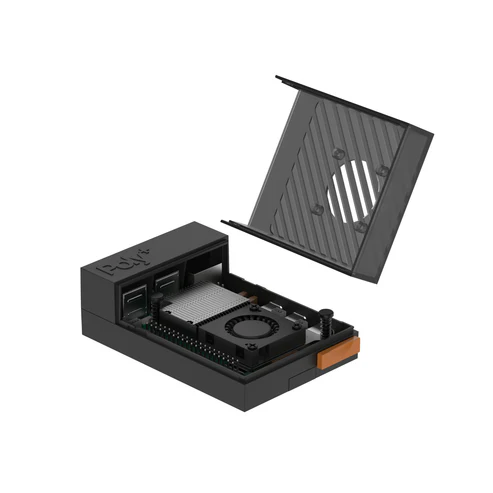
Resources
Opening the red case top
The red cover slides about 1/2cm away from the USB ports and can then be lifted up.
Fan installation
The label on the fan should be facing you when mounting it to the case top. You will need to apply pressure on the screws when mounting the fan so that they can create a unique thread to hold the fan in place.
Raspberry Pi 5 board installation
To fit your Raspberry Pi into the Poly+ case, there will be plastic tabs on either side of the black rood piece labelled "Poly+" that you need to remove by squeezing both sides together. The Pi can then be inserted, with the Poly+ roof being clipped back into place over the USB ports

R44.44 Inc VAT R59.90
This battery holder accepts 3x AA batteries and features a USB (female) output giving you a different way to power your project compared to traditional battery holders. The onboard switch allows convenient power control and the slide-out top cover makes it quick and easy to change batteries.
In terms of voltage, AA batteries are usually available in 1.2V (rechargeable/carbon-zinc) or 1.5V (alkaline), meaning this USB battery holder can offer between 3.6V and 4.5V depending on which battery chemistry is used and their condition.
Whilst this won't power most 5V development boards, it works great with the Raspberry Pi Pico (when combined with a Micro-USB cable) which can accept 1.8V to 5.5V input - so you really can't go wrong no matter which type of battery you use!
We also think this might be super-duper for powering simple circuits and projects (or even other 3.3V devices with a wide input range). Perhaps combine with a USB breakout cable or simply splice one of your old unwanted cables at home?
Features
- 3x AA battery holder
- Can be used with rechargeable or standard AA batteries
- Up to 3.6V to 4.5V output (depending on battery type and condition/charge)
- On/Off switch for power control
- USB-A female output
- Slide-off battery cover (no screw included)
- Dimensions (approximate)
- Battery box: 68mm x 47mm x 17mm
- Cable length (to tip): 90mm
What's in the box?
1 x Triple AA Battery Holder with female USB A
Need batteries? You will find our battery selection here

R149.90 Inc VAT R189.90
This kind of 8 way joystick is originally used in arcade games, but we think it is a good solution for DIY projects that need multiple frequency buttons. There is 4 micro switches that detect the stick position and users can easily get the stick positions by reading the voltage output from the connector with a controller such as Arduino and Raspberry Pi.
Features
- 8 way operation.
- Mountable in control panels.
- Easy to operate with high sensitivity.
- Use it to DIY your own Arcade gaming machine.
Specifications
- Top Ball Diameter: Approx. 35mm
- Total Size: Approx. 95x60x100mm
1 x Joystick
Cables not included
Resources
- Learn about RetroPie
- Compatible with Zero Delay Arcade USB Encoder & Wire Set (Not included)
- Compatible buttons

R284.12 Inc VAT R349.90
Take inspiration from the golden age of video games and learn how to write your own modern classics
Code the Classics Volume I not only tells the stories of some of the seminal video games of the 1970s and 1980s, but shows you how to create your own games inspired by them, following examples programmed by Raspberry Pi co-founder Eben Upton. You’ll learn how to install Python, Pygame Zero, and an IDE so you can run and edit the games in this book. You'll also:
- Get game design tips and tricks from the masters
- Learn how to code your own games with Pygame Zero
- Explore the code listings and find out how they work
You'll meet these vintage-inspired games, and learn from their code in between rounds of play:
- Boing!: All it took was a couple of lines and a dot, and gamers would be queuing up to play.
- Cavern: Enduringly popular, the platform game genre is still packed with creative possibilities.
- Infinite Bunner: Play around with the benefits that a top-down perspective can lend to the classic platform genre.
- Myriapod: Some shooters confine the gameplay to a single screen while limiting the player's movement. Restrictions can build challenge and difficulty, making for truly addictive gaming.
- Substitute Soccer: Top-down games of pinball-style soccer built a huge cult following and kicked off a sports genre that's still going strong.
What's in the box?
1 x book(Code the classics V1 2nd edition)
read more at https://www.raspberrypi.com/news/code-the-classics-volume-ii-from-raspberry-pi-press/

R369.90 Inc VAT R399.90
Code the Classics Volume II not only tells the stories of some of the seminal video games of the 1980s, but shows you how to create your own games inspired by them, following examples programmed by Andrew Gillett, ably assisted by Raspberry Pi co-founder and CEO Eben Upton along with Sean M. Tracey. In this book, you'll learn how to run and edit the games in this book by installing Python, Pygame Zero, and an IDE. You'll also:
- Get game design tips and tricks from the masters.
- Understand the fundamental tasks needed for every game: display images, play sound effects and receive inputs from the keyboard or a game controller.
- Learn how to code your own games with Pygame Zero, a library that helps automate those tasks.
Explore the code listings and find out how they work.
You'll meet these vintage-inspired games, and learn from their code in between rounds of play:
- Avenger: fly across a scrolling landscape while you save humans from malevolent aliens.
- Beat Streets: fight your way through a level, and defeat a notorious crime boss.
- Eggzy: collect gems and survive as long as possible before time runs out.
- Leading Edge: Race a car on a pseudo-3d race track.
Kinetix: Break bricks with your paddle, and use powerups to avoid various menaces.
What's in the box?
1 x Code the classics Vol2

R179.89 Inc VAT R199.90
- Waveshare POE board for RPi5
- Waveshare M.2 HAT+
- Raspberry Pi M.2 HAT+
- Raspberry Pi M.2 HAT+ AI Kit
- we are testing some more HATs....
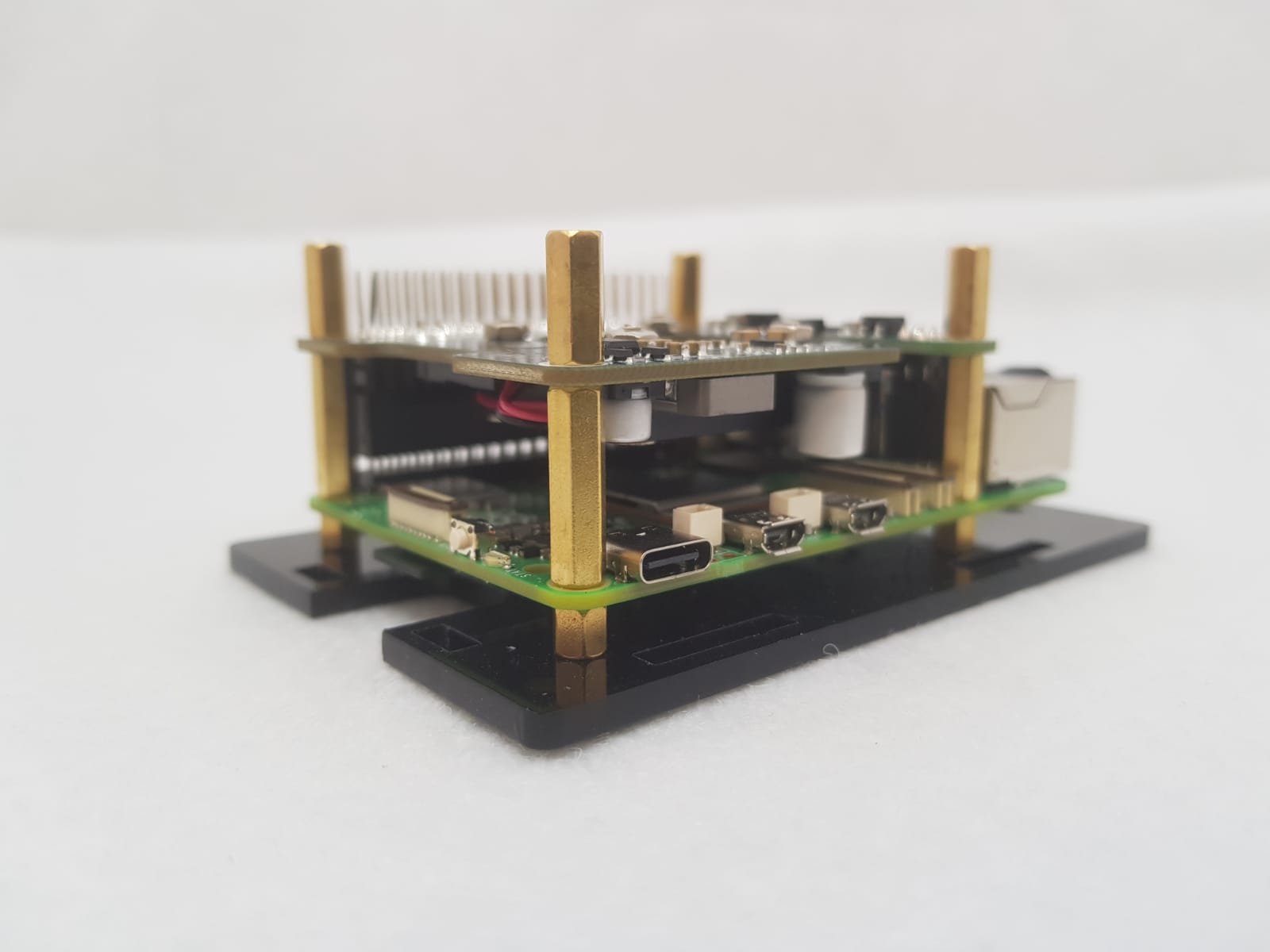
This DIY case requires assembly. You will need a small precision flathead screwdriver.
Clear 3mm Acrylic Panels to protect your Raspberry Pi 5.
- PCIe
- DSI/CSI Interfaces
- Wall mounting holes
- Airflow Vents On The Top And Front
- With Power On/Off Button
- Easy To Pull & Plug TF Card On The Bottom
- Ample space to fit the RPi5 heatsink included with the POE board or with most other HATs the Raspberry Pi Active Cooler(not included)
What's in the box?
1 x PI5-CASE-F
1 x Nonskid rubber pad (4PCS)
1 x Screwdriver
1 x Screws and standoffs pack
Resources

R149.90 Inc VAT R182.90
Consumables Accessories Kit for Laser Etcher
Unleash your creativity and enhance your laser etching projects with this Consumable Accessories Kit. Whether you're a professional or a hobbyist, this kit offers everything you need to achieve precise and clean cuts every time.
Key Features:
- Comprehensive set of accessories designed for compatibility with laser etchers.
- High-quality materials ensure durability and long-lasting performance.
- Easy to use, allowing even beginners to get started right away.
- Includes essential items to maintain and enhance your laser etcher's functionality.
What's in the box?
Consumable Accessories Kit (To go with Laser Etcher )

R1,739.89 Inc VAT R1,790.48
Get started with the Raspberry Pi with one of our pre-boxed kits for home, industry and education.
These kits are perfect for beginners that are just just getting exposed to the Raspberry Pi, Media enthusiasts looking to stream online content with Kodi, developers looking to exploit the many advantages of the RPI's GPIO pins and anybody looking to get some cool goodies at a great price! They contain all of the essential items that you need to get up and running in no time.
Please Note: These kits are pre-boxed and cannot be modified at all, we do however keep stock on all of the individual items so if you have a special need simply feel free to browse through the rest of our product offerings and select the items that you'd like.
What's in the box?
1 x Official 5.1V 5A 27W USB-C PD Power Supply in Black
1 x 1m micro HDMI cable
1 x 32GB preloaded micro SD card with 64bit Raspberry Pi OS pre-loaded
1 x Official Pi5 Black/Grey Case with fan and heatsink
Want to take your kit to the next level?
Turn your RPI into a Media Centre
Grab yourself a remote control, install LibreELEC or OSMC when setting up your RPI and you'll be streaming in no time. You can even add a wireless keyboard, mouse or other similar controllers
Want a cheap eco-friendly PC
Grab a Keyboard and Mouse, select Raspbian when setting up your RPI and you'll be browsing the web, sending emails, editing spreadsheets and watching videos just like you're used to with a desktop/laptop.
We know you love retro gaming!
RetroPie allows you to turn your Raspberry Pi into a retro-gaming machine Check out our Arcade section, whether you just want a retro control or a mini DIY arcade cabinet we have what you're looking for.
Did somebody say Robotics?
We've got some cool beginner's items in our robotic section
Our Kits come with the latest version of Raspberry Pi OS pre-installed, While we will certainly try our best to assist with any software related questions we cannot offer any kind of official support on community driven, open source, or non-PiShop produced proprietary software.
NOOBS, Raspbian, RetroPie, LibreELEC and OSMC are all examples of open-source software, please visit the developer's respective websites for more info.
Resources
A whole bunch of other really cool technical info can be found here.
Where do I start?.........Getting Started with Raspberry Pi
More on the Raspberry Pi 5

R418.12 Inc VAT R549.90
Motion 2350 Pro - Advanced Robotics Controller for Beginners
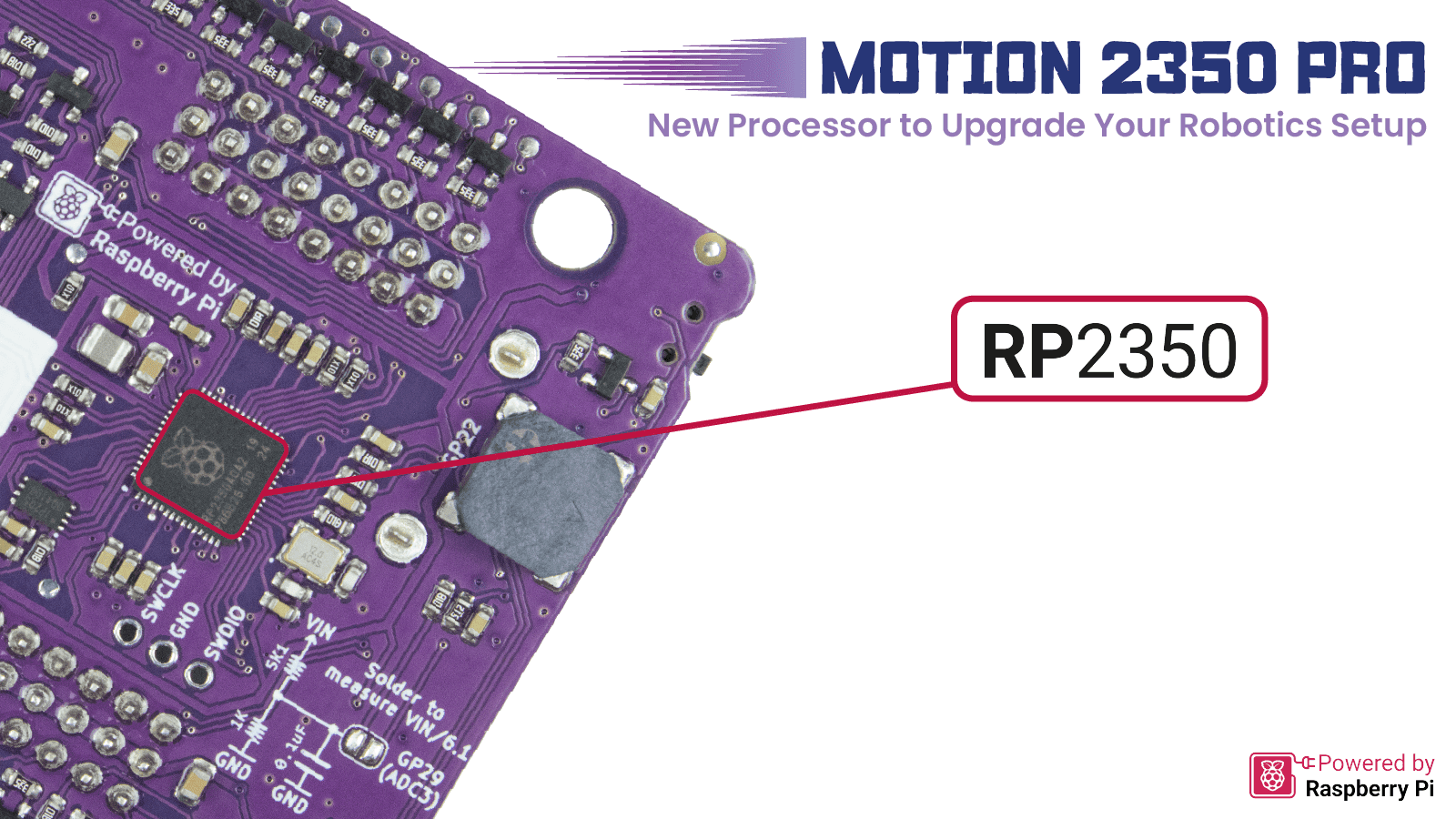
It has been a few years since the first microcontroller by Raspberry Pi, the RP2040, was launched. Now, Raspberry Pi has introduced the latest upgraded processor, the RP2350. Introducing MOTION 2350 Pro, designed by Cytron, leveraging the new RP2350 processor. Built for beginner and intermediate users to experience the Pro version of the board. Ideal for those who want to build an advanced robot, minimize efforts on electronics, and focus on mechanics.
More Power, More Ports, More Connectivity
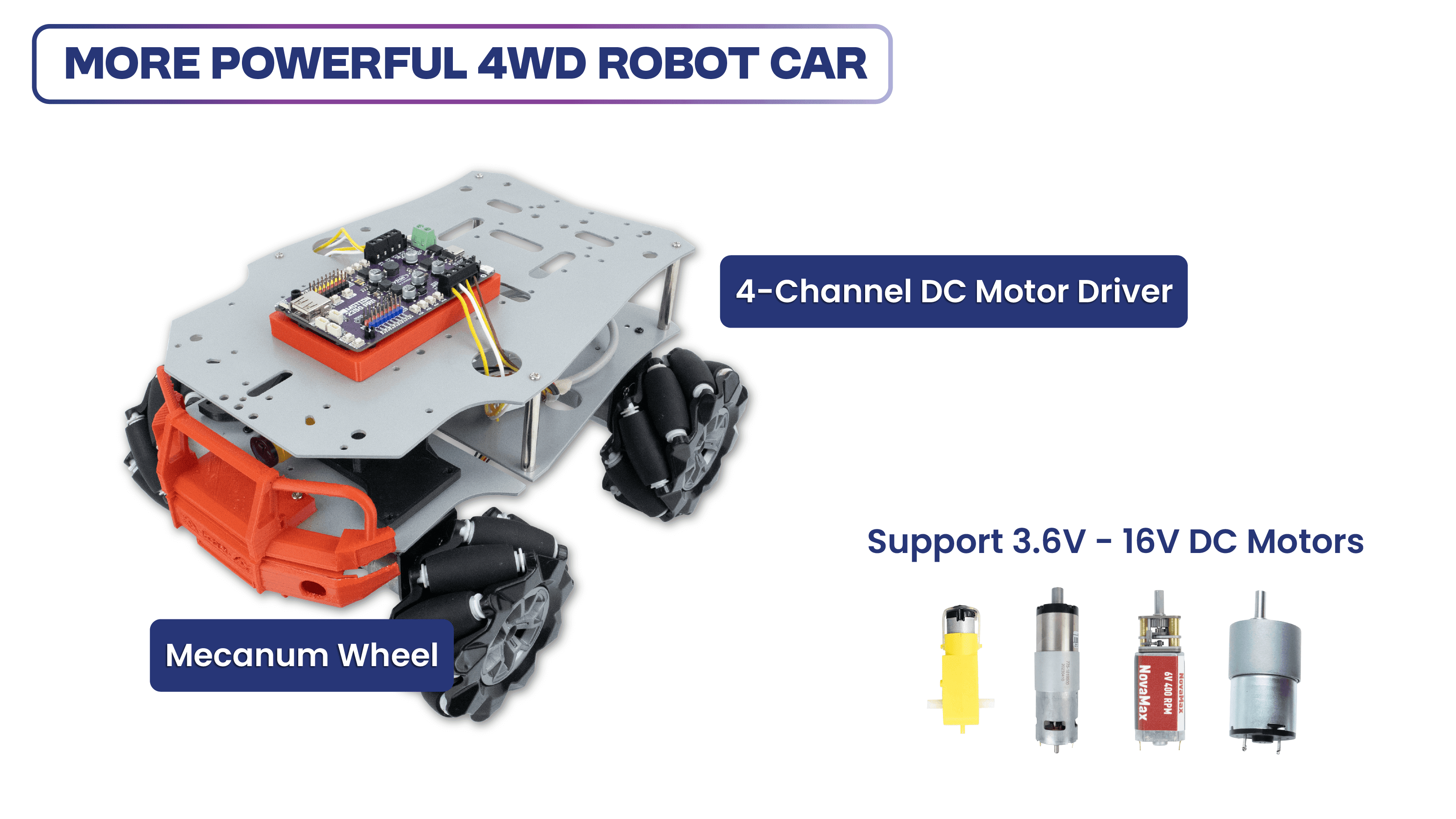
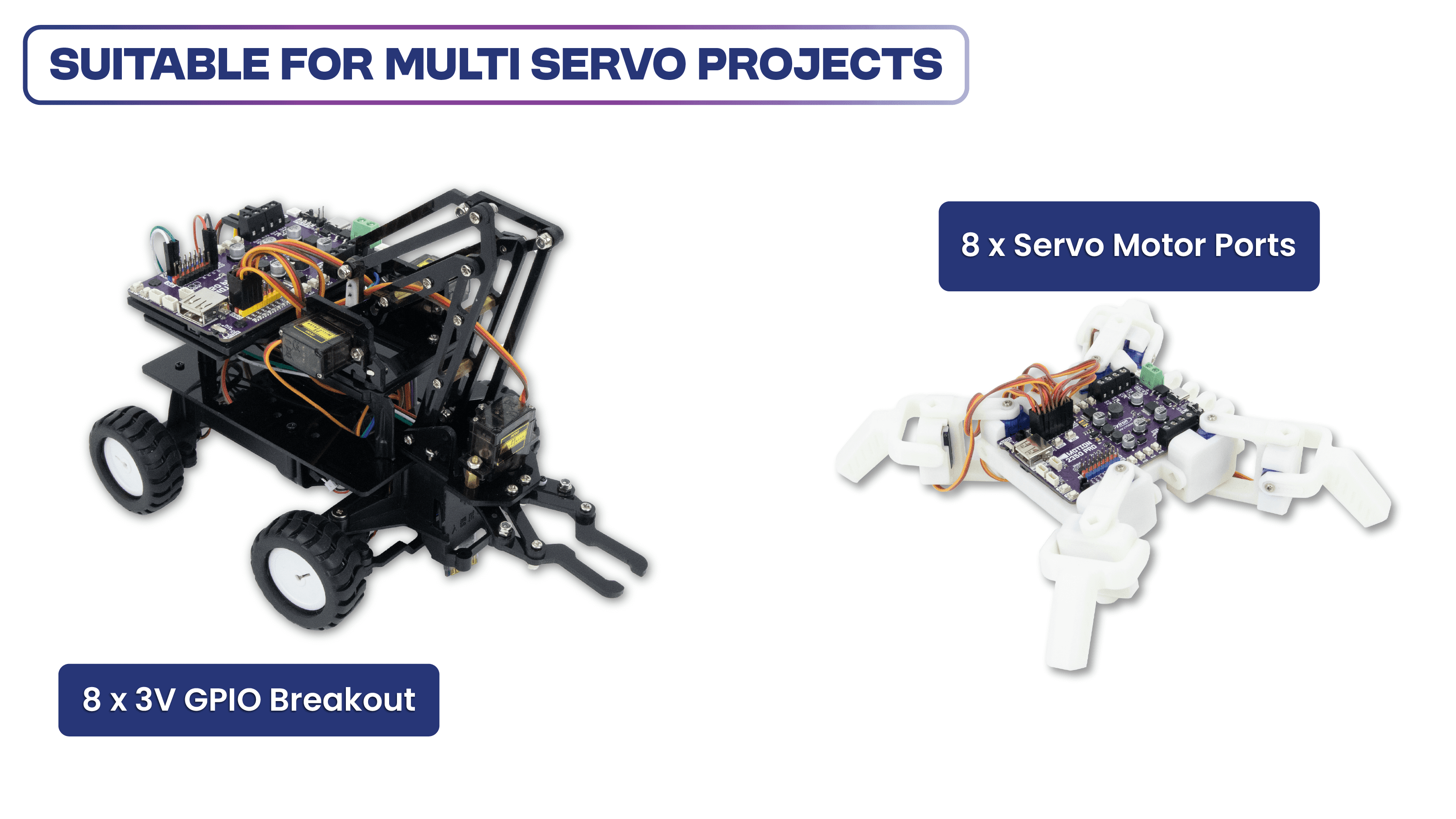
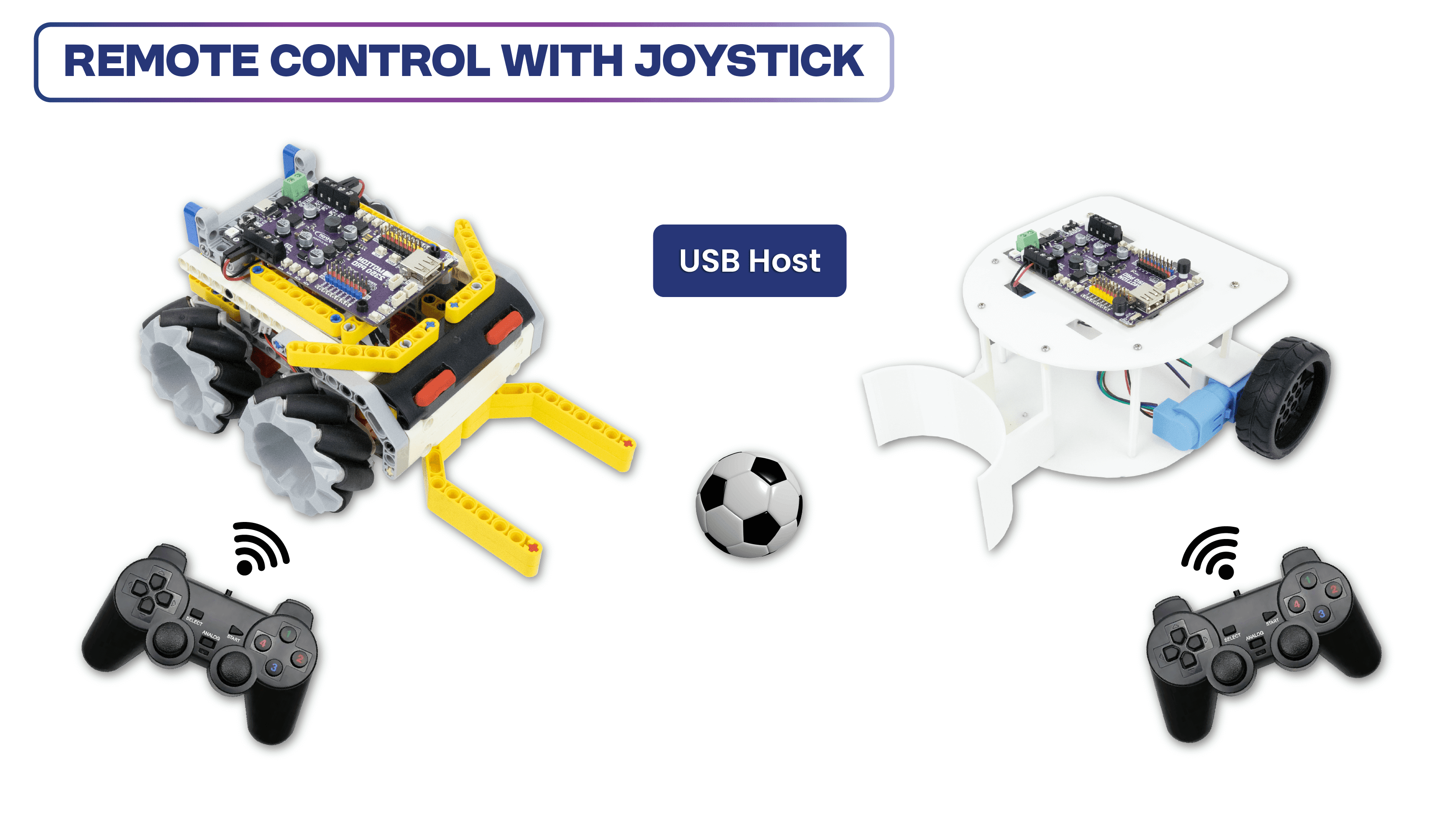
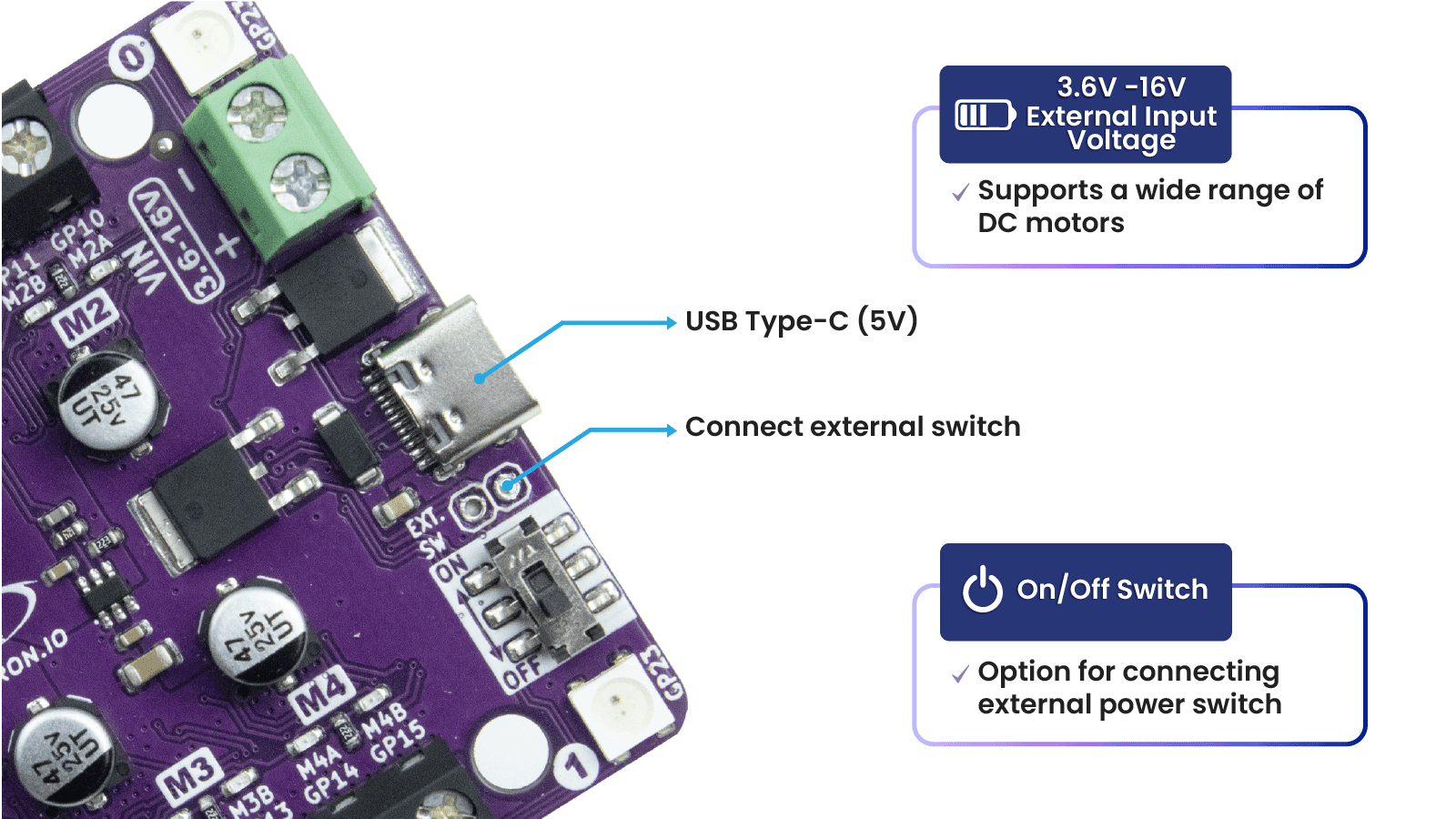
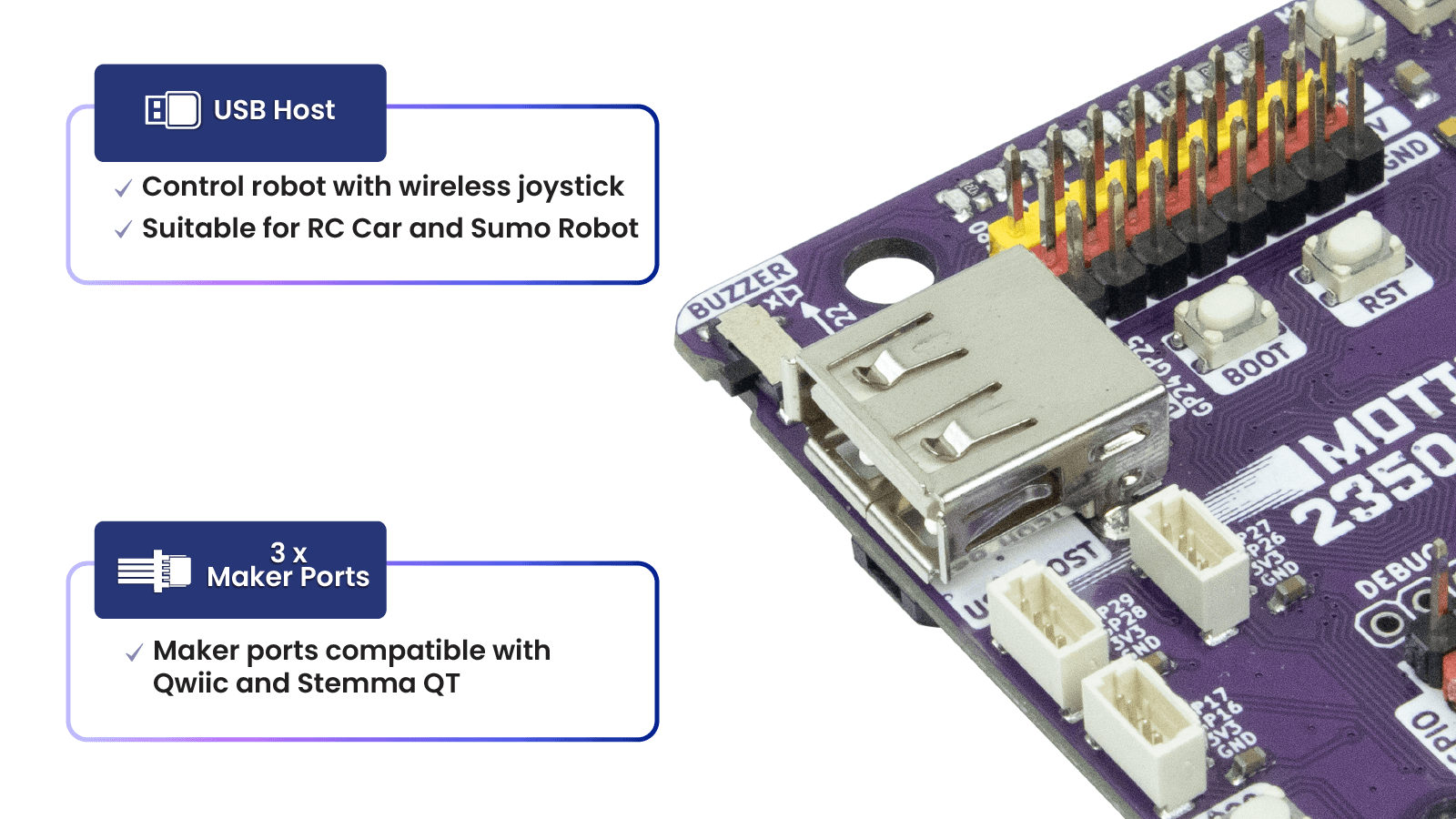
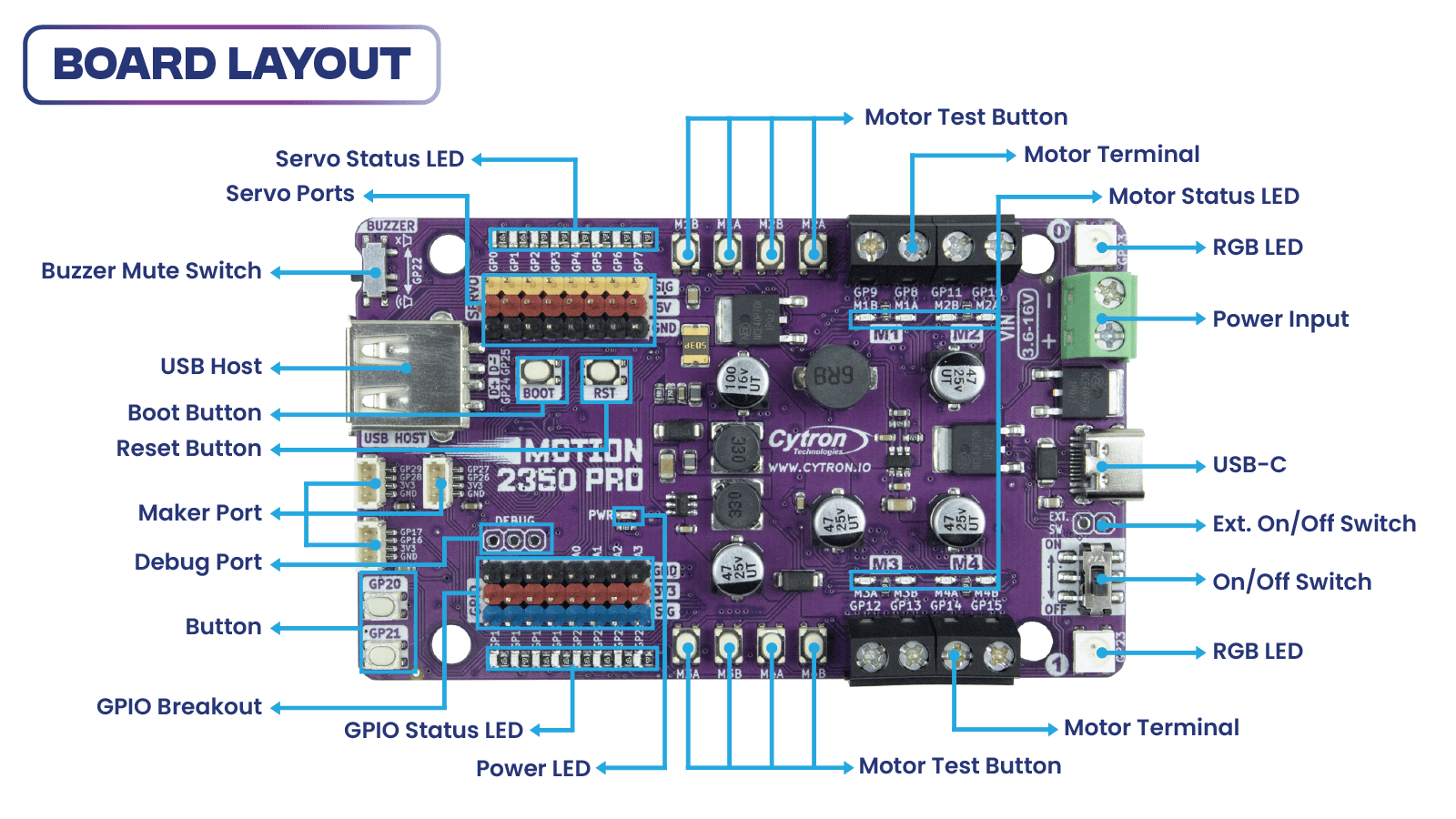
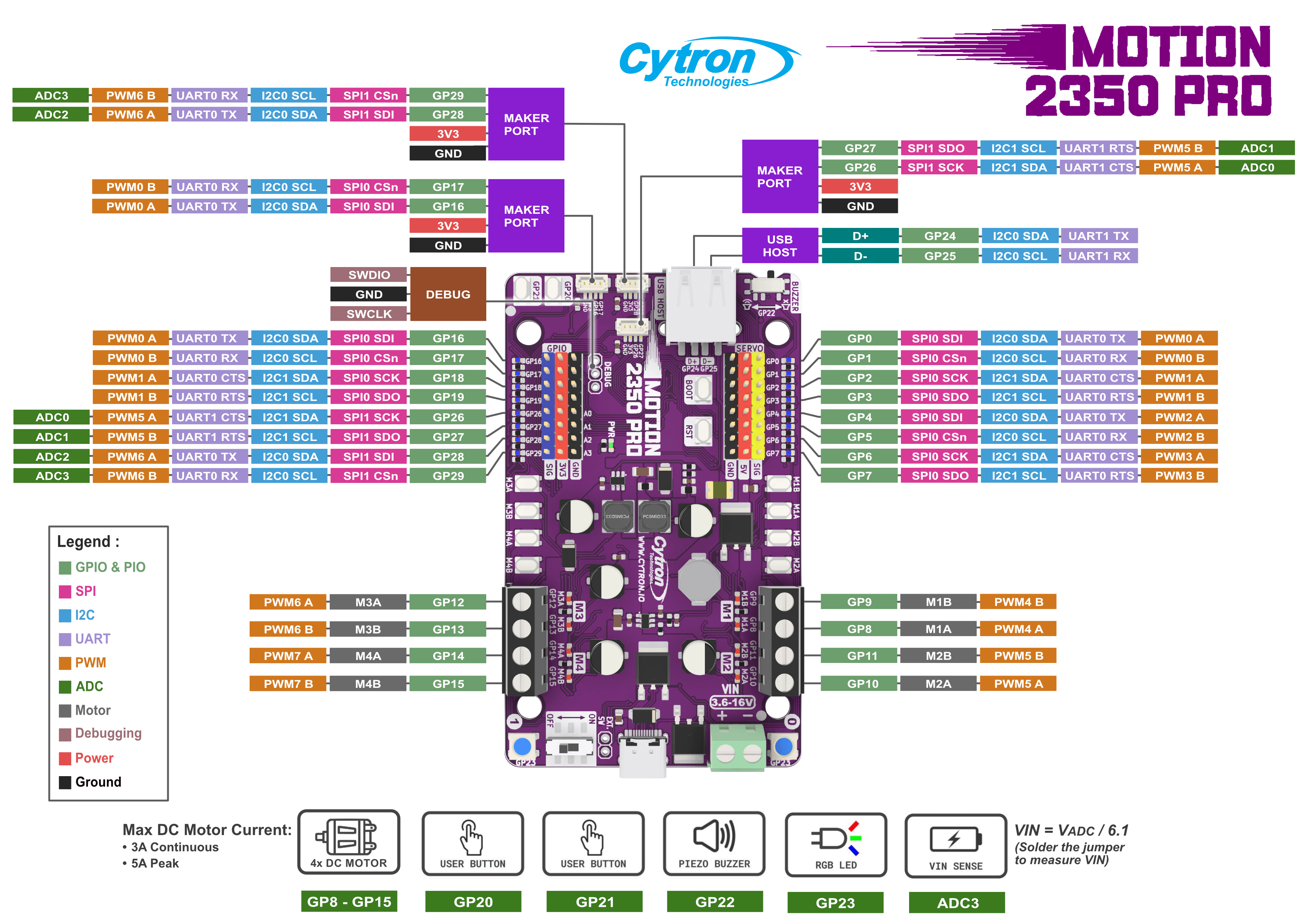
The Motion 2350 Pro features an advanced DC motor driver capable of controlling up to 4 brushed DC motors (3A Max each channel), with voltage ratings from 3.6V to 16V. Building a powerful robot with mecanum wheels has never been easier, thanks to this robust 4-channel driver! Additionally, the controller is equipped with 8-channel 5V servo ports, 8-channel GPIO breakout, and 3 Maker Ports, enabling you to connect a wide array of components and sensors. The highlight? The Motion 2350 Pro comes with a direct USB host for a USB joystick/gamepad, ensuring true plug-and-play convenience.
Favourable Maker Features
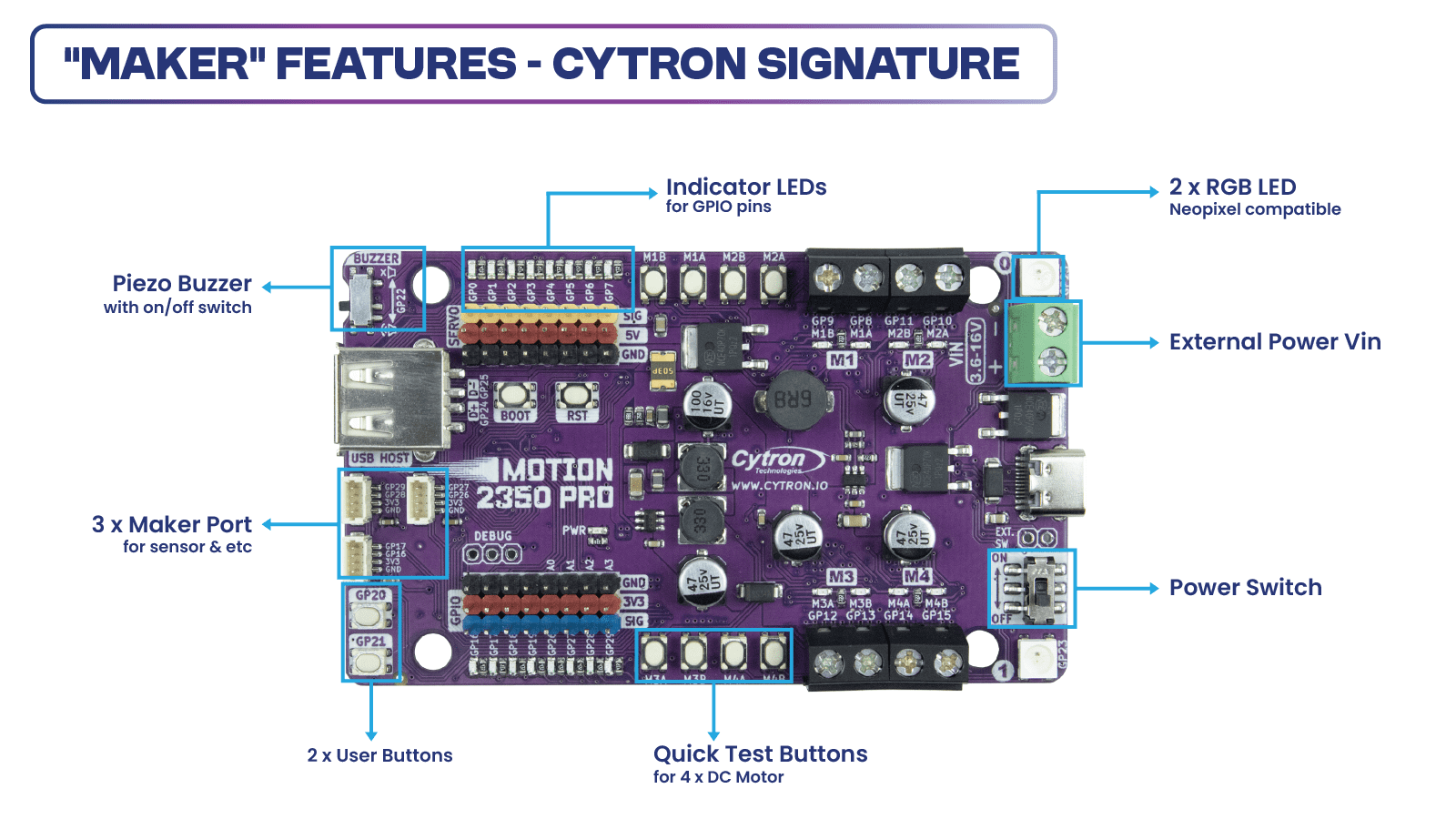
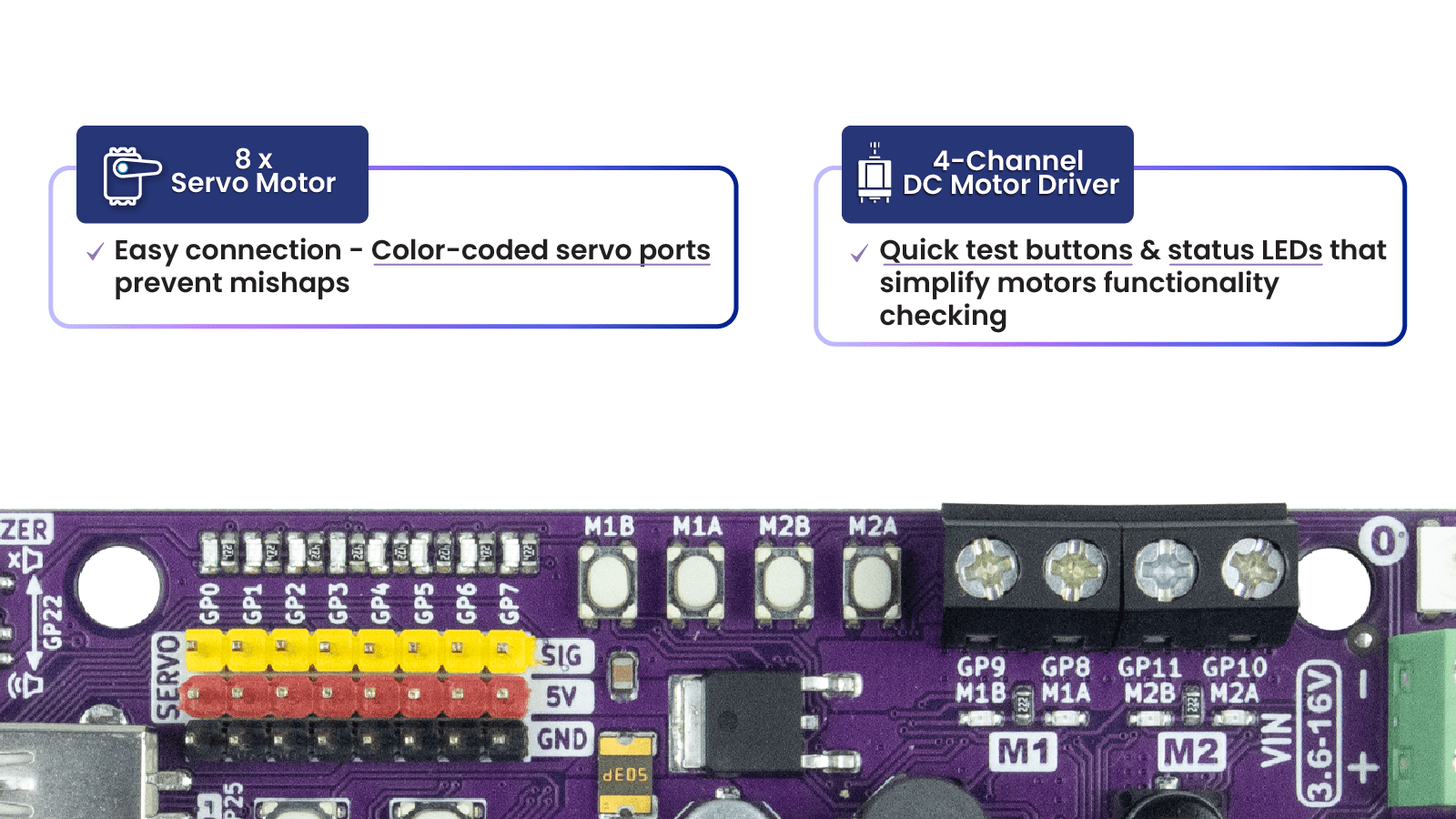
“Maker” features have been a signature of Cytron products. GPIO references printed on the silkscreen and colored headers help beginners connect components to the correct GPIO pins. The built-in quick test buttons and motor output LEDs allow for quick and convenient functional testing of the motor driver without writing any code. The user buttons and piezo buzzer are also beneficial for running simple commands, eliminating the need for extra wiring! Of course not to forget the LED indicator for each Digitial IO pin.
The MOTION 2350 Pro combines the Raspberry Pi Pico 2, the benefits of the Maker series, an advanced robot controller, and other useful features. Therefore, this board is compatible with the existing Raspberry Pi Pico ecosystem. Software, firmware, libraries, and resources developed for Pico should work seamlessly with the MOTION 2350 Pro allowing users to program in familiar environments such as Python (MicroPython, CircuitPython), C/C++, and Arduino IDE (coming soon).
CircuitPython is preloaded on the MOTION 2350 Pro, running a simple demo program right out of the box. Connect it to your computer via a USB-C cable and turn it on. You will be greeted by a melody tune and running LED lights. Press the GP20 and GP21 push buttons to run another demo code. With this demo code and quick test buttons, you can test the board the moment you receive it!
Specifications
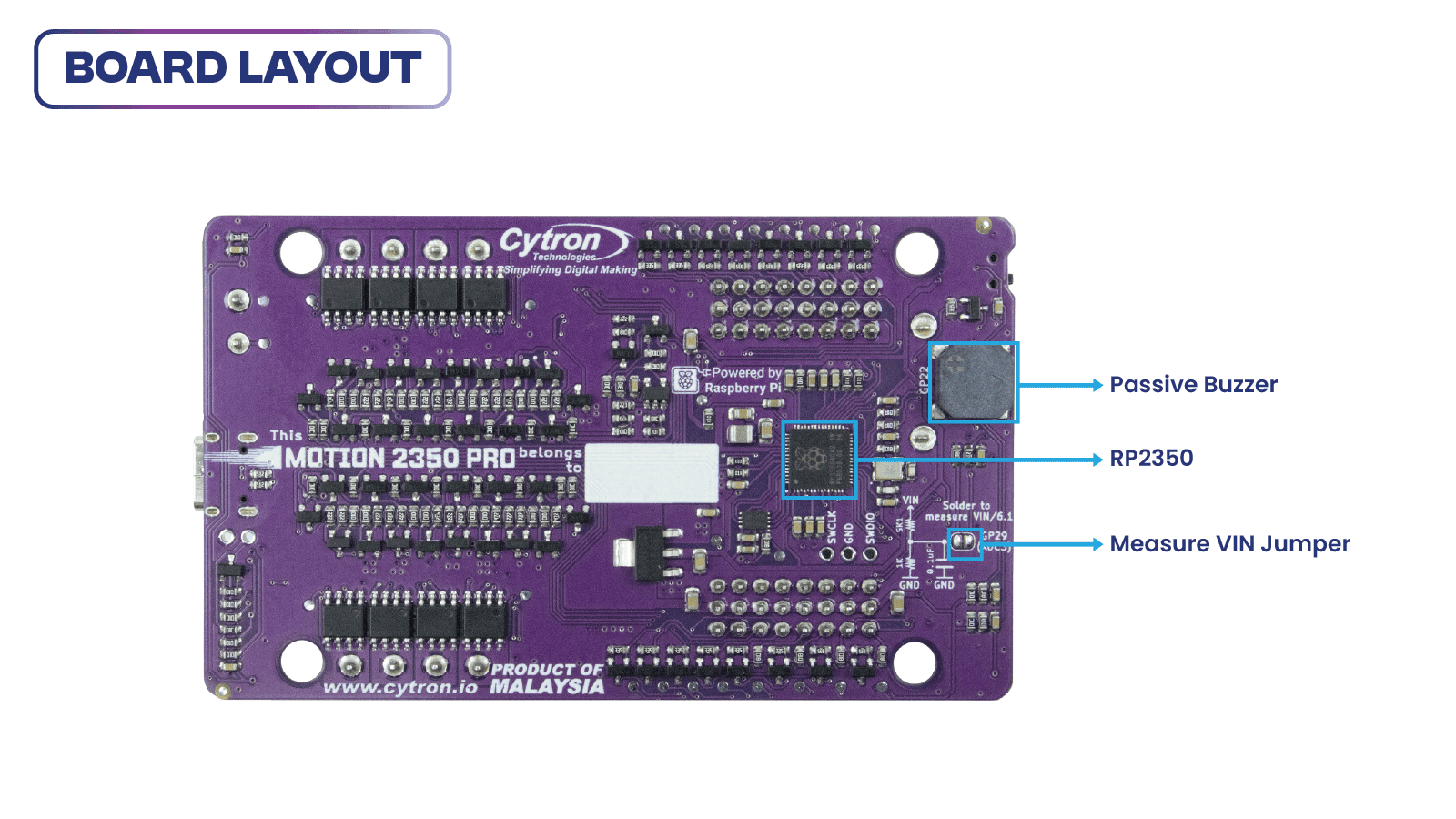
- Powered by Raspberry Pi RP2350
- Dual-core Arm Cortex-M33 processor
- 520KB internal RAM
- 150MHz Frequency Clock
- 2MByte Flash
- Robot Controller Board
- 4 x DC Motor Driver (with quick test buttons)
- 8 x Servo Motor
- 8 x 3V GPIO Breakout
- Input Power
- VIN Terminal: 3.6V - 16V
- USB Type-C: 5V
- Maximum DC Motor Current, each channel
- Continuous: 3A
- Peak: 5A
- 24 x Status indicator LEDs
- 8 x for Servo Port
- 8 x for 3V GPIO Breakout
- 8 x for DC Motor Driver
- 12 x Push Button
- 8 x Quick Test Button for DC Motor
- 2 x User Button
- 1 x BOOT Button
- 1 x RST Button, for reset
- 3 x Maker Port
- 2 x RGB LED (Neopixel Compatible)
- 1 x USB Host
- 1 x Piezo Buzzer (with mute switch)
- 1 x On/Off Switch (with MOSFET Shock-Proof Circuit)
- Preloaded with CircuitPython by default
- Programming Language
- CircuitPython
- MicroPython
- C/C++
- Arduino (coming soon)
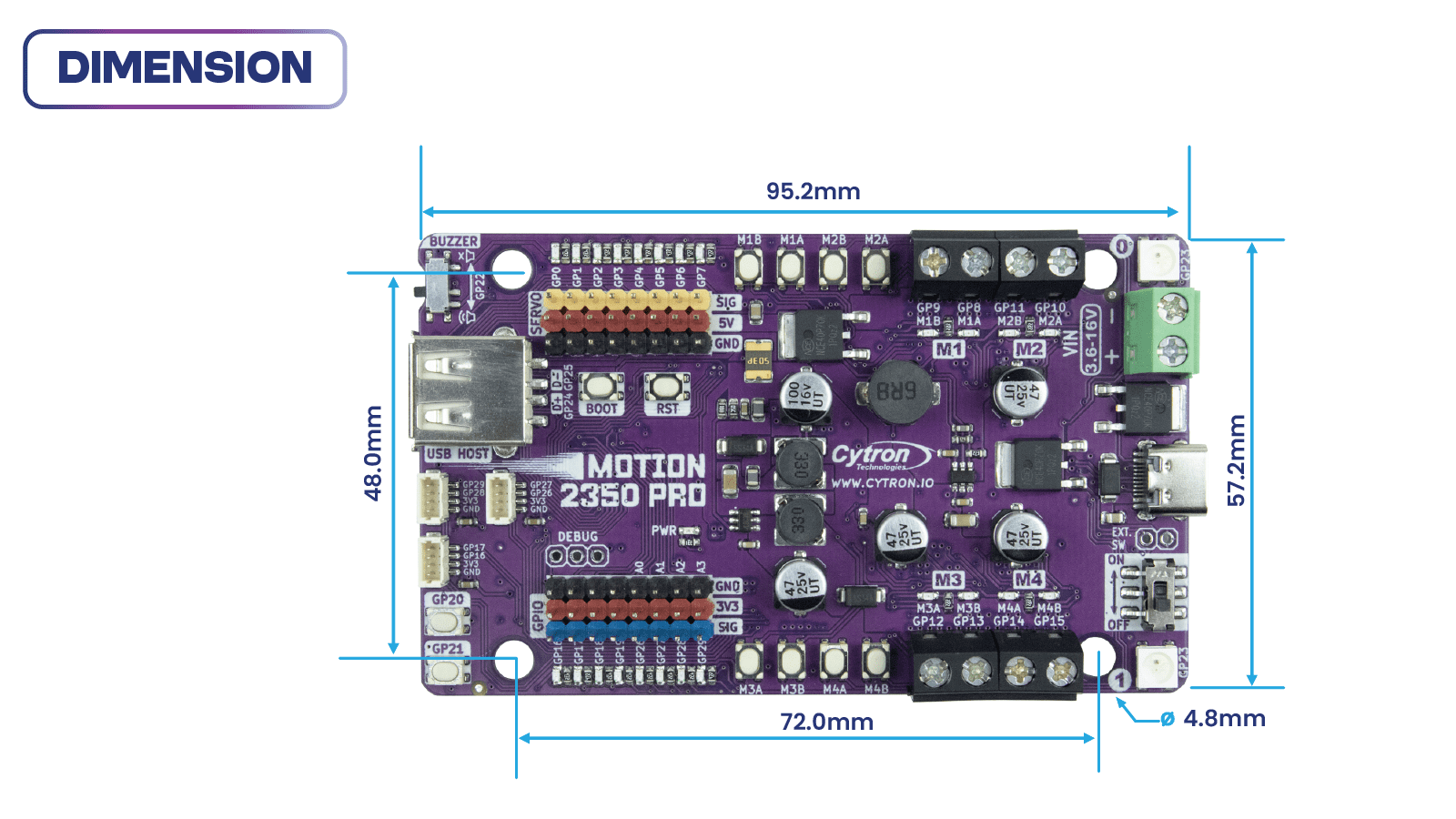
- Board Dimension: 95.2 x 57.2 x 8 (height) mm
What's in the box?
1 x MOTION 2350 Pro
1 x STEMMA QT / Qwiic JST SH 4-pin Cable with Female Sockets (150mm)
2 x Grove to JST-SH Cable (200mm)
1 x Set of Silicone Bumper
4 x Building Block Friction Pin
1 x Mini Screwdriver
Resources
RP2350 Datasheet (pdf), by Raspberry Pi
Getting Started with MOTION 2350 Pro, tutorial by Cytron Technologies
SDK C/C++, from Raspberry Pi
Article by CNX Software

SmartiPi Touch 2 Back Cover Small 15mm (smartipi2 15mm cover)
The back for the cover for SmartiPi Touch 2 allows you to cover HAT boards or other additional electronics on the back of the SmartiPi Touch 2.
R153.05 Inc VAT R199.90
The back for the cover for SmartiPi Touch 2 allows you to cover HAT boards or other additional electronics on the back of the SmartiPi Touch 2.
The covers include four M4 mounting screws that attach the cover to the 75mm VESA mount holes on the back of the case.
Note: The cover does not work with the door or the fan door.
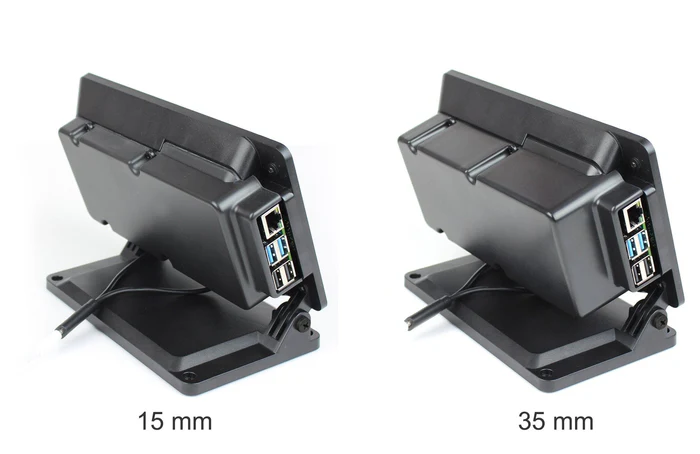
Choose between 35mm and 15mm versions. Dimensions are inside dimensions from the back of SmartiPi Touch. They are made out of ABS plastic.
What's in the box?
1 x Smartipi Touch 2 backcover

SmartiPi Touch 2 Back Cover Large 35mm (smartipi2 35mm cover)
The back for the cover for SmartiPi Touch 2 allows you to cover HAT boards or other additional electronics on the back of the SmartiPi Touch 2.
R153.05 Inc VAT R199.90
The back for the cover for SmartiPi Touch 2 allows you to cover HAT boards or other additional electronics on the back of the SmartiPi Touch 2.
The covers include four M4 mounting screws that attach the cover to the 75mm VESA mount holes on the back of the case.
Note: The cover does not work with the door or the fan door.
Choose between 35mm and 15mm versions. Dimensions are inside dimensions from the back of SmartiPi Touch. They are made out of ABS plastic.
What's in the box?
1 x Smartipi Touch 2 backcover

R678.36 Inc VAT R899.90
An all-in-one, USB-C powered controller for WS2812/Neopixel and APA102/Dotstar addressable LED strips.
Plasma 2350 is powered and programmable by USB-C and, because USB-C is capable of drawing up to 3A of power, that's enough to power a healthy chunk of LEDs. There's a useful button that you could use to switch between effects, plus a reset button and an onboard RGB LED. We've also popped a QW/ST connector on there, to make it super easy to plug in Qwiic or STEMMA QT breakouts.
You can buy a Plasma 2350 on its own, or in a kit with a USB-C cable and some super-cool LED stars, so you can get started lighting stuff up right away.
Features
- Powered by RP2350A (Dual Arm Cortex M33 running at up to 150MHz with 520KB of SRAM)
- 4MB of QSPI flash supporting XiP
- Compatible with 5V WS2812/Neopixel/SK6812 and APA102/Dotstar/SK9822 LEDs
- Screw terminals for attaching your LED strip.
- USB-C connector for power and programming (3A max)
- Qw/ST (Qwiic/STEMMA QT) connector
- Intriguing new SP/CE connector
- Reset, BOOT and a user button (the BOOT button can also be used as a user button)
- RGB LED
- Fully-assembled (no soldering required)
- Measurements: approx 61 x 22 x 12mm (L x W x H, including connectors)
- Programmable with C/C++ or MicroPython
STARter Kit contains
- Plasma 2350
- USB-C cable for power and programming
- 10m RGB LED Star Wire
Pintout and Schematic
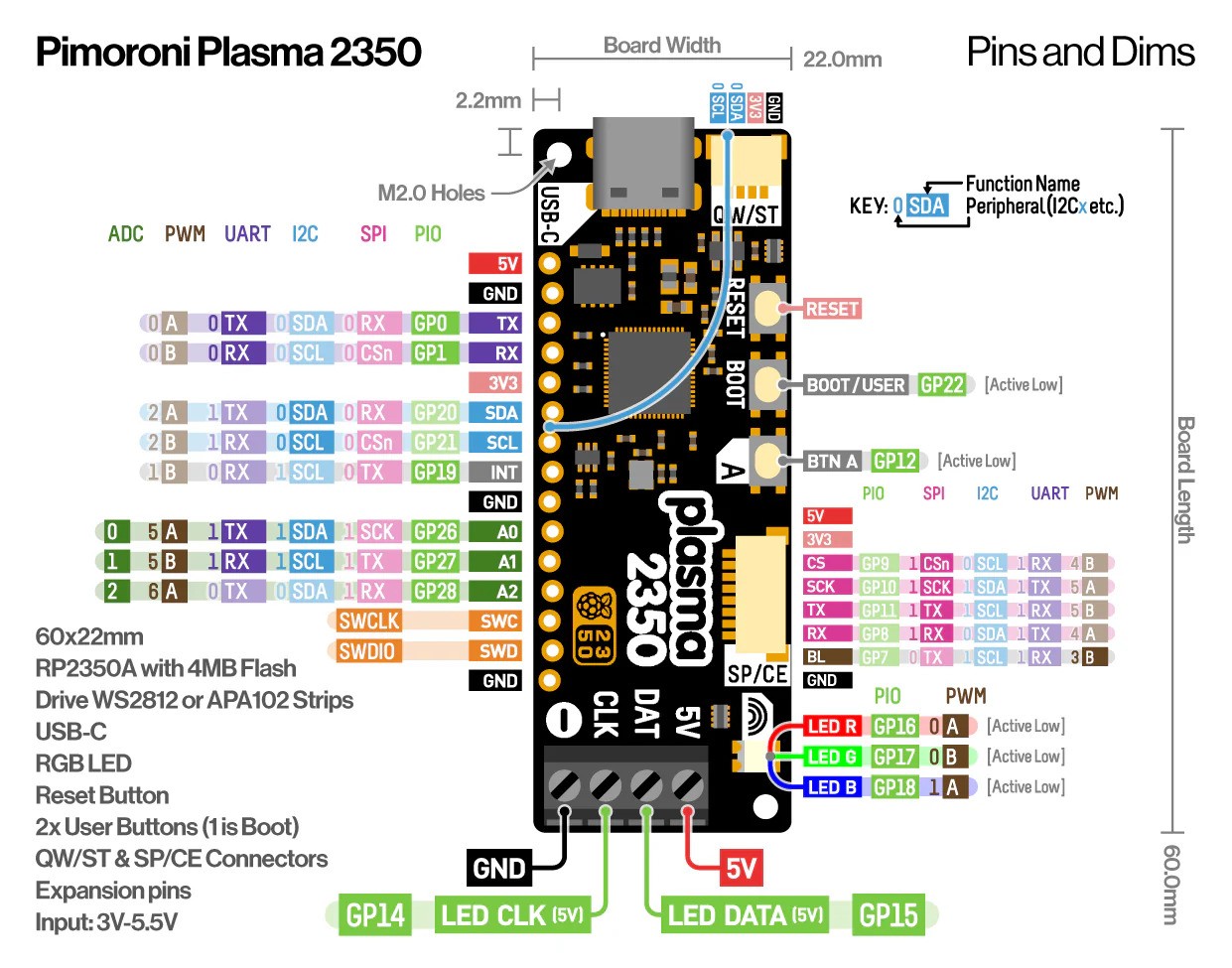
- Download a printable PDF version
- Schematic (coming soon)
Getting Started
Connecting Breakouts
If your breakout has a QW/ST connector on board, you can plug it straight in with a JST-SH to JST-SH cable, or you can easily connect any of our I2C breakouts with a JST-SH to JST-SH cable coupled with a Qw/ST to Breakout Garden adaptor.
We've also broken out the I2C, analog, UART and debug pins so you can solder things like breakouts or analog potentiometers directly to them (or solder on a strip of header and plug the whole shebang into a breadboard).
About RP2350
The RP2350 chip is the Double Quarter Pounder & Fries to the RP2040's Double Cheeseburger and can have one or more RISC-V burgers instead of either of the M33 ARMs, to stretch the metaphor.
In addition to the modern M33 ARM cores, there are sides of: more PIO capability, a variety of low power states for sipping electrons, a whole security system and some sprinklings of specialist digital video circuits to offload DVI/HDMI output.
You can expect a tasty boost in performance - our "real world" MicroPython tests are running up to 2x faster compared to RP2040, and floating point number crunching in C/C++ is up to 20x faster. The extra on-chip RAM will make a big difference when performing memory intensive operations (such as working with higher resolution displays) and even more can be added thanks to external PSRAM support.
RP2350 comes in two flavours - A (standard) and B (all the pins). The B chip has a stonking 48 usable GPIO pins, including 8 ADCs and 24 PWMs, and features on some of our new products.
What's in the box?
1 x Dotstar addressable LED strips
1 x USB to USB-C Cable
1 x Plasma 2350